
Intro
-
The topic for today is very simple, but it's a guide for people like me who want to use not only OpenClaw but also the full harness of Claude Code for just $20, instead of paying the $100+ monthly subscription fee for Claude Code.👾
-
Performance aside, I'm using the $20 Ollama Pro model with the satisfaction of a $100 Claude Code Max. The token limit is more than sufficient; if anything, it's more generous. I even run OpenClaw🦞 on the same plan.
-
You can also try Ollama Cloud with a free account! If you're interested, I recommend testing it right away. :)
-
-
From my personal experience, the Ollama Cloud models aren't quite at the level of Opus yet, but I feel they're performing around the level of Haiku. It also seems there are no issues using them with cool harnesses like Superposers - Ouroboros, which I introduced in a previous post.
-
If you're new to Claude Code, it might be a good idea to start with Ollama for a light experience and then move on to a paid Claude Code plan if you feel its limitations. :)
0. Install Ollama & Claude Code ✔️
- You must, of course, have Ollama and Claude Code installed. If you haven't installed them yet, download and install Ollama on your PC, and do the same for Claude Code.
1. Set Up Environment Variables ⚙️
- If you want to permanently use Claude Code with Ollama models, set up your environment variables as shown below. If you don't plan to set this up permanently, SKIP this part! 🧜
macOS / Linux 💻
- In
~/.zshrcor~/.bashrc, add the following:# Add the following to ~/.bashrc or ~/.zshrc export ANTHROPIC_AUTH_TOKEN="ollama" export ANTHROPIC_API_KEY="" export ANTHROPIC_BASE_URL="http://localhost:11434" # Save and apply source ~/.zshrc # (or source ~/.bashrc)
Windows 🪟
-
If you're a Windows user, there are two methods.
1. Open Powershell and enter the following.
# Edit your profile notepad $PROFILE # Add the following $env:ANTHROPIC_AUTH_TOKEN = "ollama" $env:ANTHROPIC_API_KEY = "" $env:ANTHROPIC_BASE_URL = "http://localhost:11434" # After saving . $PROFILE -
If the profile file doesn't exist:
New-Item -Path $PROFILE -ItemType File -Force
2. Add the three variables above as system environment variables
-
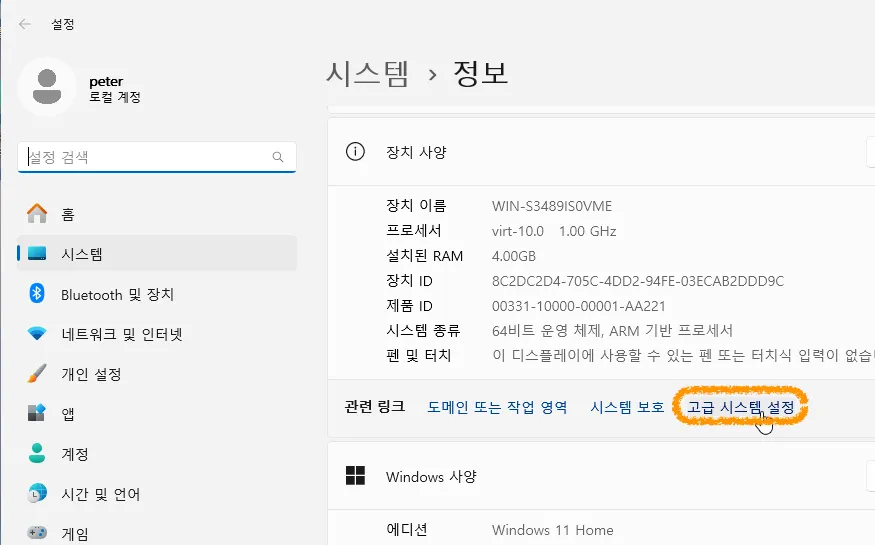
Win + X → "System" → "Advanced system settings"
-
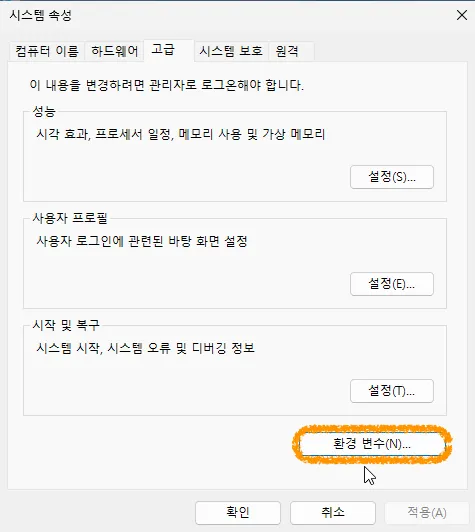
→ "Environment Variables..."
-
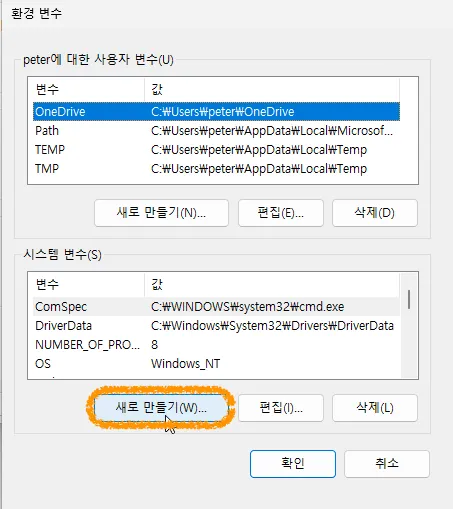
Click "New..."
-
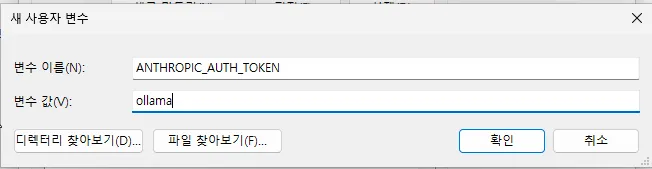
Add the 3 variables from above
-
Reboot
2. Run Claude Code!👾
-
If you permanently set up Claude to use Ollama in step 1, you can start with the following command!
claude --model gemini-3-flash-preview:cloud
-
The great thing about a permanent setup is that the
claudecommand will now work with Ollama models, allowing you to use options like--dangerously-skip-permissions! 😎 -
By setting up an alias in your .zshrc as shown below, you can also solve the hassle of using Claude Code with options like --dangerously-skip-permissions with a simple command.😉
alias cc='claude --model gemini-3-flash-preview:cloud --dangerously-skip-permissions'
-
-
If you just want to try using Claude with Ollama, you can quickly check it out with the command below.😁
ollama launch claude
-
As of April 2024, the
gemini-3-flash-preview:cloudmodel seems to be the smartest one available on Ollama..! Use gemini-3-flash... use it twice..🤗
3. Actually, Codex and OpenCode are also possible!
- You can set up Codex and OpenCode in the same way. It's almost identical. Check the official documentation.
Not because I'm too lazy to write it out lol
Wrapping Up 🍳
- It's that easy, right? 👨🏻🎨 🖼️



2 comments
좋은 툴 하나 얻어갑니다! 바로 테스트 해봅니다!
gemini-3-flash-preview:cloud 모델이 제일 괜찮은거 같더라고요! ㅎㅎㅎ 화이팅입니다! 댓글 감사해요~~
Please login to leave a comment.